 HiveSuite
Why the Customer Portal changes everything
If you've ever spent an evening chasing quote approvals, or wondered why an invoice from three weeks ago still isn't paid, you know the frustration. Most business software sends customers one-off email links - they click, they view, the link expires, and there's no easy way back. The HiveSuite Customer Portal is different.
Every customer gets their own persistent account with secure login credentials. They can return anytime to check job progress, review their history, approve quotes, pay invoices, send messages, and upload documents. It's an ongoing relationship, not a series of disconnected transactions.
Less admin, more earning
Stop chasing approvals and payments. Customers handle it themselves through their portal - you get notified when they take action.
Get paid faster
Invoices with online payment links through Stripe mean customers pay immediately. Money in your account, invoice marked paid, zero manual work.
Look more professional
A branded portal with your logo and colours shows customers you run a serious operation. Stand out from competitors still using email links.
Complete customer history
Customers see all their jobs, quotes, and invoices in one place. No more digging through emails or asking "what did we do last time?"
Customer Portal Setup Guide
Learn how to enable and configure the Customer Portal for your business
View all how-to videosFeature deep dive
For your customers
Everything they need in one professional, branded space. No more digging through emails or chasing for updates.
- Secure personal login with their own credentials - not a shared link that expires.
- View current and past jobs with full status updates as you progress the work.
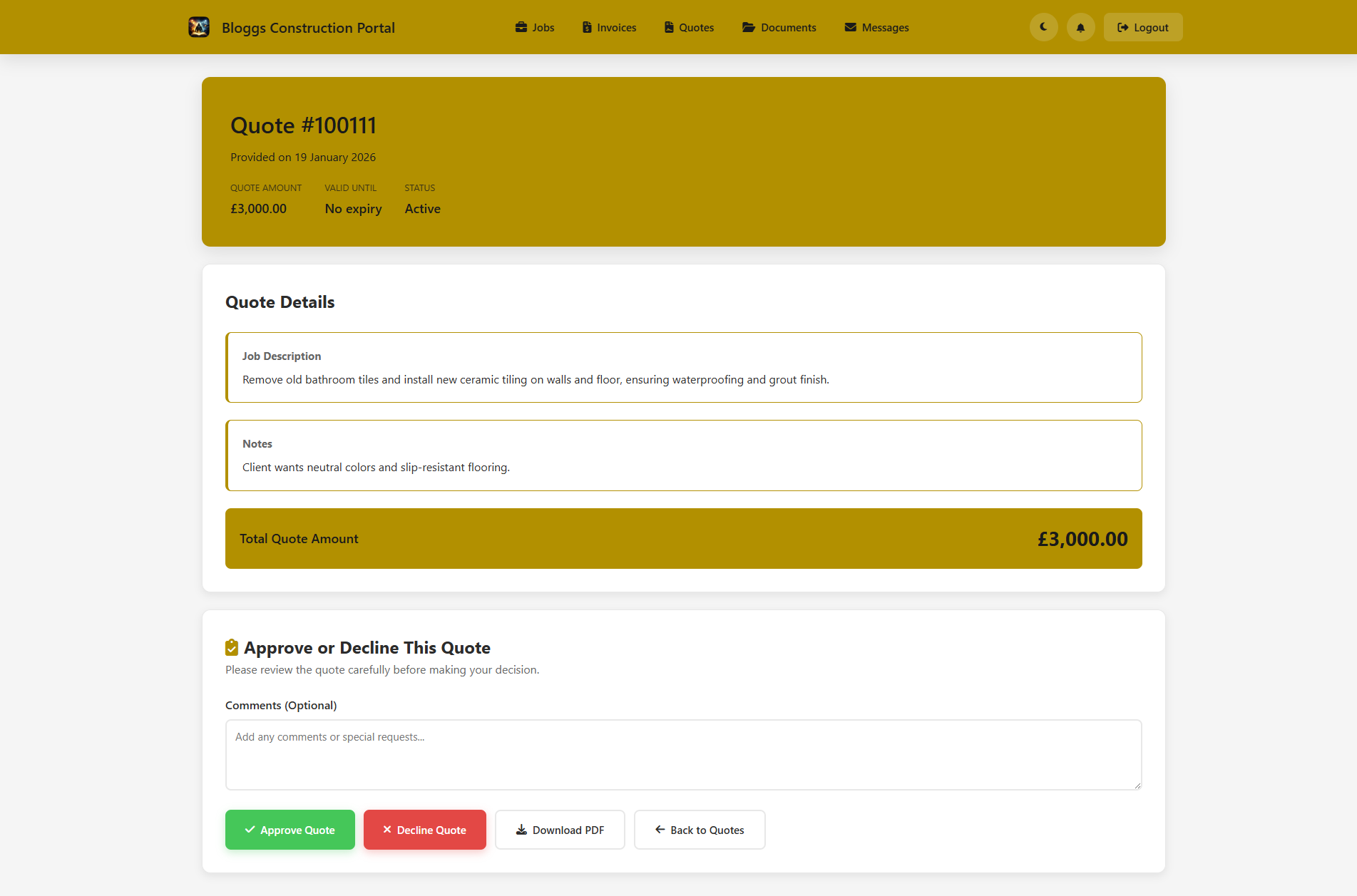
- Review and approve quotes with complete line-item detail before you start.
- Pay invoices online securely via Stripe - any time, from any device.
- Message your business directly with all communication stored in one thread.
- Upload documents, photos, plans, and specs - all attached to the relevant job.
Result: customers feel informed and in control, reducing support calls and building trust in your business.
For your business
Save hours every week. Reduce phone calls and emails chasing approvals. Get paid faster. Present a more professional image.
- Fully branded to your business - your logo, colours, and business name throughout.
- Granular permissions let you control what each customer can see and do.
- Real-time notifications when quotes are approved or payments are made.
- Built-in messaging keeps all customer communication in one place - not scattered across emails and texts.
- Per-customer overrides let you tailor portal access for individual customers when needed.
- Works on any device - customers access their portal from desktop or mobile.
Perfect for mobile service businesses, contractors, and any business that wants to reduce admin and look more professional.
More than just email links
Most business software sends your customers one-off email links to view a single quote or invoice. Once they've clicked it, there's no easy way back.
- Persistent customer accounts - not disposable links that expire or get lost.
- Customers can return anytime to check job progress without requesting a new link.
- Complete history of all quotes, invoices, and jobs in one place.
- Two-way messaging means conversations aren't buried in email threads.
- Document uploads attached to jobs - not floating around in separate emails.
- An ongoing relationship, not a series of disconnected transactions.
The HiveSuite Customer Portal gives every customer a proper account - their history, their documents, their communication, all accessible whenever they need it.
Getting started
How it works
- Send a quote from HiveSuite - customer gets an email notification with a link to their portal.
- Customer logs in with their own secure credentials and reviews the quote.
- They approve directly in the portal - you get an instant notification.
- Complete the job and issue an invoice - it appears in their portal automatically.
- Customer pays online via Stripe - invoice marked paid automatically.
Security & control
- Individual credentials for each customer - passwords hashed and stored securely.
- Automatic session timeouts after periods of inactivity.
- Complete data isolation - each customer only sees their own information.
- Admin controls let you enable or disable portal access with one click.
- Opt-in per customer - only customers you explicitly enable receive login credentials.
Easy setup
- Enable the Customer Portal in your HiveSuite settings.
- Customise branding with your logo and colours.
- Choose which customers get portal access.
- Customers receive login credentials automatically.
- Start sending quotes and invoices through the portal immediately.
Ready to give your customers their own portal?
Enable the Customer Portal in your HiveSuite settings, add your branding, and start sending quotes and invoices through a professional, branded experience. Your customers will thank you - and you'll spend less time chasing approvals and payments.
- Enable Customer Portal in settings
- Add your branding and logo
- Invite your first customers
- Send a quote through the portal
30-day free trial. No credit card required.